Option Trades: Options Flow Scanner Tape, UOA & Block Trades
Live options flow tracker in TradingFlow: real-time tape, unusual options activity filters, sentiment, DEX, blocks, and premium flow after Rank shortlists.
Option Trades in TradingFlow is the real-time option flow / options flow tracker: it answers what options are trading right now, and where is the flow concentrated? Pair it with Rank Symbols as your scanner shortlist for unusual options activity. You get 6 live market KPI cards, aggregated or raw trade data, filters across 13 numeric dimensions (including DTE for 0DTE work), symbol search, watchlist, and columns for premium, sentiment, DEX, and DEI. Learn the loop: Option Trades tutorial, flow concepts, best options flow scanners.
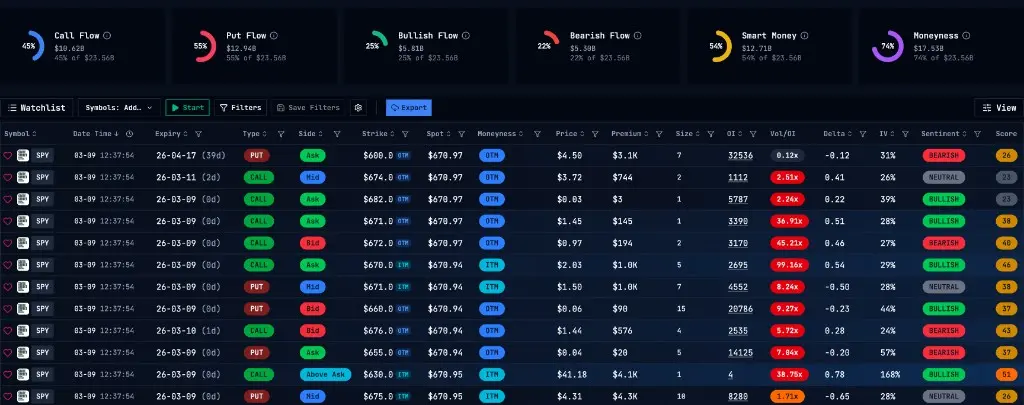
Flow table (cropped to the tape grid):
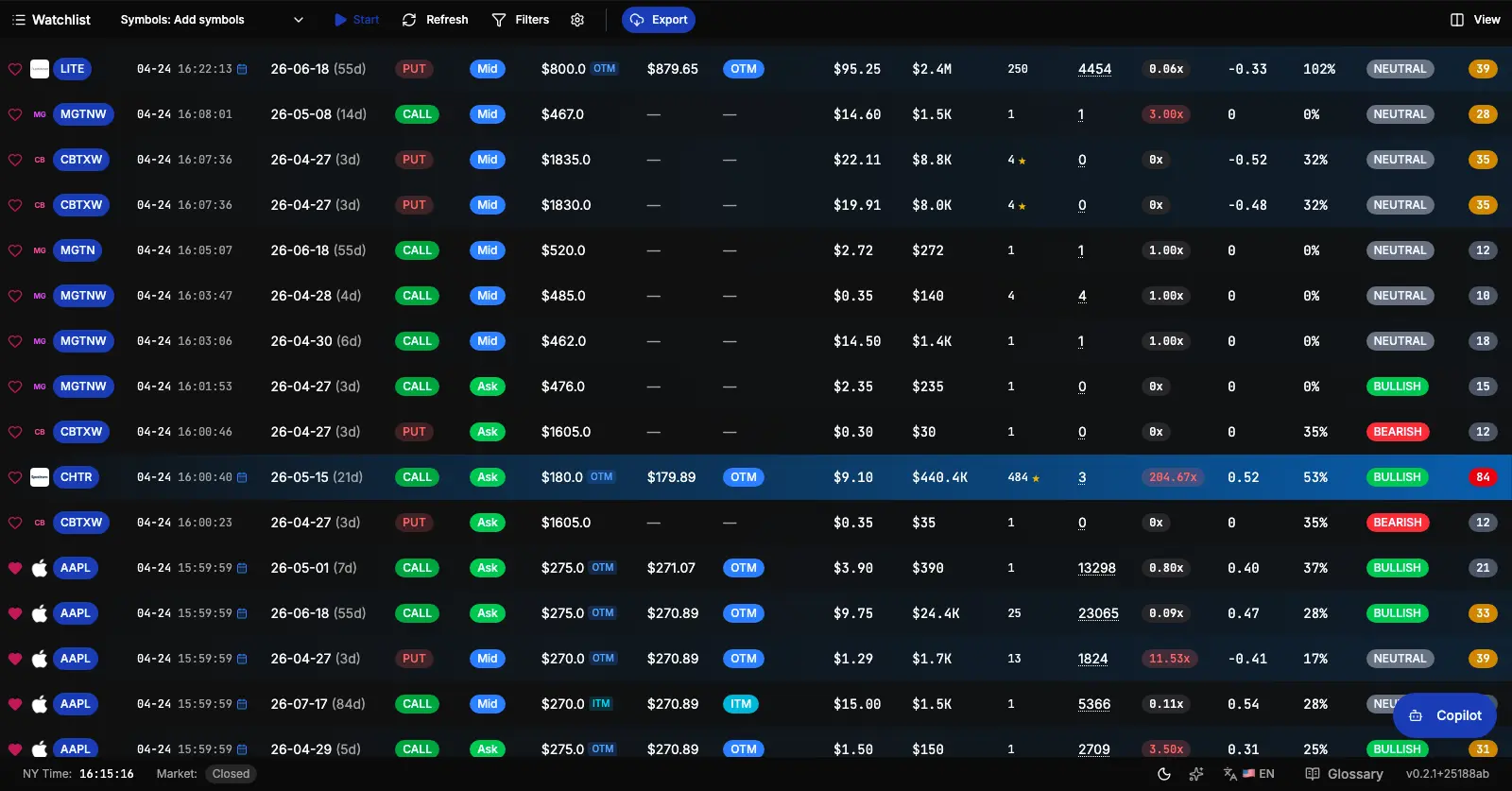
Filters modal (13-dimension controls; labels may reflect your tier):
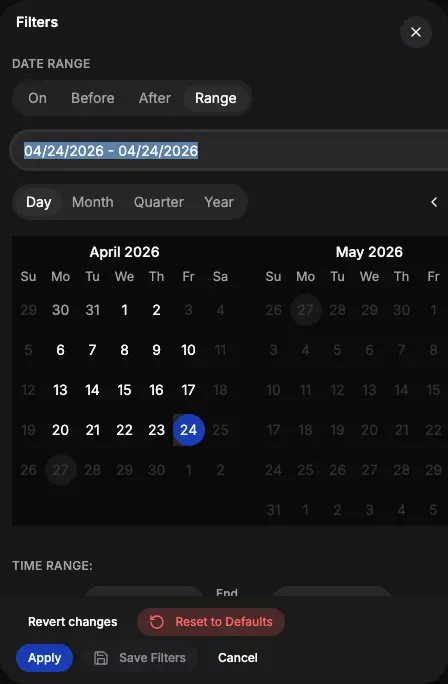
Market KPI cards
Six summary cards sit above the table and update with every data fetch — they give you the market-level picture before you touch any filters.
| Card | What it shows |
|---|---|
| Call Flow % | Call premium as a share of total premium for the visible dataset |
| Put Flow % | Put premium share |
| Bullish Flow % | Premium from bullish trades (Call Buys + Put Sells) |
| Bearish Flow % | Premium from bearish trades (Put Buys + Call Sells) |
| Smart Money % | Share from aggregated (simultaneous block) trades — often institutional |
| OTM Moneyness % | Out-of-the-money premium share, indicating speculative positioning |
Each card shows both the percentage and the dollar amount so you always have absolute size for context.
Same surface with the six KPI cards directly above the tape:
What Option Trades shows
The app uses real-time (or near real-time) trade data. Choose between aggregated and raw mode to either scan for block-sized flow or drill into exact Time & Sales.
- Aggregated mode — Trades for the same option symbol in the same second are rolled into one row. Ideal for spotting block trades and unusual flow; columns include size, premium, sentiment, DEX, DEI.
- Raw mode — Unaggregated Time & Sales for exact trade-level detail when you need it.
- Symbol filters and watchlist — Focus on specific underlyings or use your watchlist to track a set of names.
- Sortable columns — Reorder by premium, size, sentiment, DEX, DEI, or time. Changing sort (outside Live Mode) is a premium-gated interaction on the live app.
Filters and filter modal
Click Filters in the toolbar to open a comprehensive filter panel. Every filter type is organized into sections:
Date and time
- Date range — Pick any day, month, quarter, or year range from a flexible date selector (operators: is, before, after, between). Only trading dates with available data are selectable.
- Time range — Narrow to a specific time window within the trading day.
Asset type, side, and trade attributes
- Asset type — Stock, ETF, or Index.
- Type (Call/Put) — Show only calls, only puts, or both.
- Side — Above Ask / Ask / Mid / Bid / Below Bid — filter by where the trade printed relative to the spread.
- Moneyness — ITM, ATM, or OTM.
- Sentiment — Bullish, Bearish, Neutral.
- Trade type — Block (single trade) or Sweep (two or more simultaneous exchange prints).
Numeric ranges
All 13 dimensions support both min and max bounds:
| Filter | What it limits |
|---|---|
| Days to Expiry | Filter by DTE range |
| Strike Price | |
| Underlying Price | Spot price at trade time |
| Premium | Total premium paid |
| Option Price | Per-contract price |
| Size | Number of contracts |
| Open Interest | OI at the time of the trade |
| Delta | Option delta |
| Implied Volatility | IV at the trade |
| DEI | Delta Impact (per-share delta × size) |
| DEX | Delta Exposure (dollar delta) |
| Abs DEI | Absolute value of DEI |
| Abs DEX | Absolute value of DEX |
Boolean toggles
- Recent Earnings only — Show only trades occurring near a recent earnings event.
- Opening Position only — Filter to trades that appear to be opening new positions (size > OI proxy).
- Watchlist only — Restrict the table to your saved watchlist symbols.
Applied filter summary
Active filters are shown as inline chips below the toolbar so you always know what's applied without reopening the panel.
Persistent preferences
For paid subscribers, Option Trades behaves like a professional desktop workstation: one Option Trades Preference document holds your saved view (filter state plus column layout). That view hydrates before the first server fetch where applicable, with a local backup path if preferences are slow to arrive.
Guests and signed-in unpaid users do not load that premium saved view by default. They start from the canonical public preview unless the URL carries allowed overrides—so you are not silently running someone else’s saved screener on a free account.
When you have unsaved changes, a Save button appears in the toolbar. Leaving the page with unsaved changes can trigger a browser confirmation (paid flows).
Live Flow mode
Activate Live Flow to stream incoming option trades in real time via WebSocket. The table updates continuously as new trades arrive.
Rules governing Live Flow to keep the feed coherent:
- Sort by Time (Descending) required — Before enabling, the table must be sorted by time descending. New trades appear at the top without random jumps. If sorted differently, the app offers a one-click fix to apply the correct sort and start streaming.
- Controls lock while live — Filters, pagination, and sort controls are disabled during streaming to prevent UI drift.
- Market hours — Live Flow is only active during US market hours. Attempting to start outside market hours shows an informational guard.
- Exit to adjust — Pause the stream any time to update filters or sorting, then re-enable.
Live Flow is a subscription feature.
The flow grid is the surface Live Flow appends into—while streaming, sort stays locked to time descending:
Shareable filter links
You can share a URL that encodes your current symbol and filter state. When a recipient opens the link, the app tries to initialize with those filters—tier rules still apply: unpaid users may fall back to preview when the link encodes non-preview control state, per the access contract in the product.
Browser notifications
Enable the notifications toggle in the Settings menu (⚙️ icon in the toolbar) to receive browser push notifications when trades matching your current filters arrive during Live Flow. Requires browser notification permission.
Where to find it
In TradingFlow, open Option Trades in the main nav or go directly to /app/option-trades. Use aggregated mode for flow scanning and blocks; switch to raw when you need tick-level detail. Combine with Symbol-level analysis on /app/rank/symbols for flow-ranked symbols and integrated GEX/vol/OI context, and Contract-level analysis on /app/rank/contracts when you need ranked contracts with an exact-contract handoff back into Option Trades.
Related Articles
How to use TradingFlow when trading ES/SPX intraday
A practical intraday workflow for ES and SPX traders: use Rank for market context, analyze SPXW gamma exposure, inspect chain structure, find contract candidates, and validate the tape in Option Trades.
$3.2 Billion in One Name Wasn't a Bullish Bet: How I Read Daily Option Flow on TradingFlow
TradingFlow's Daily Option Flow scanner showed $20B in single-name option premium on Aug 14 — and 16% of it landed in one name, SNDK. The size looked bullish. The biggest individual tickets said something messier. Here's how I actually read a session's tape.
Unusual Options Activity Is Not a Signal Until the Tape Checks Out
UOA alerts are noise without filters, print-level tape, and open-interest context. TradingFlow’s Option Trades and Rank surfaces make that audit possible.