Symbol-level analysis in the Rank workbench
Symbol-level analysis is now the Symbols tab of the Rank workbench. It ranks the universe by option flow, adds integrated GEX/vol/OI/chain inspection tabs, and keeps Option Trades handoff and CSV export behind the right access boundaries.
Symbol-level analysis in TradingFlow (navigation: Rank → Symbols; historically also called Market Rank) answers: for a chosen session date, which names lead by options flow, volatility, and positioning context? The current route is /app/rank/symbols. Legacy paths such as /app/market-rank and /app/symbol-level redirect into this tab.
You get a ranked table, symbol lookup, per-symbol inspection drawer (Overview, Flow, Positioning, GEX, Vol, Chain), optional AI summary tools where enabled, and an Option Trades handoff—tuned to how flow is actually distributed that day, not a generic “volume only” read.
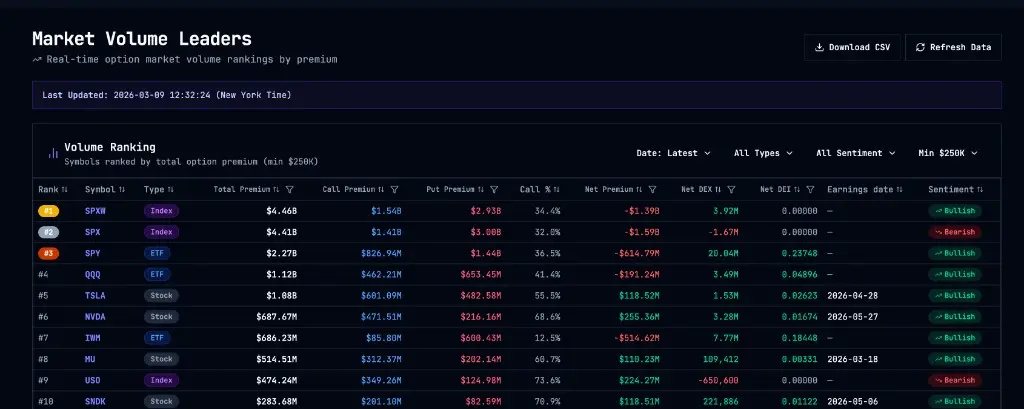
Ranked table (cropped to the grid):
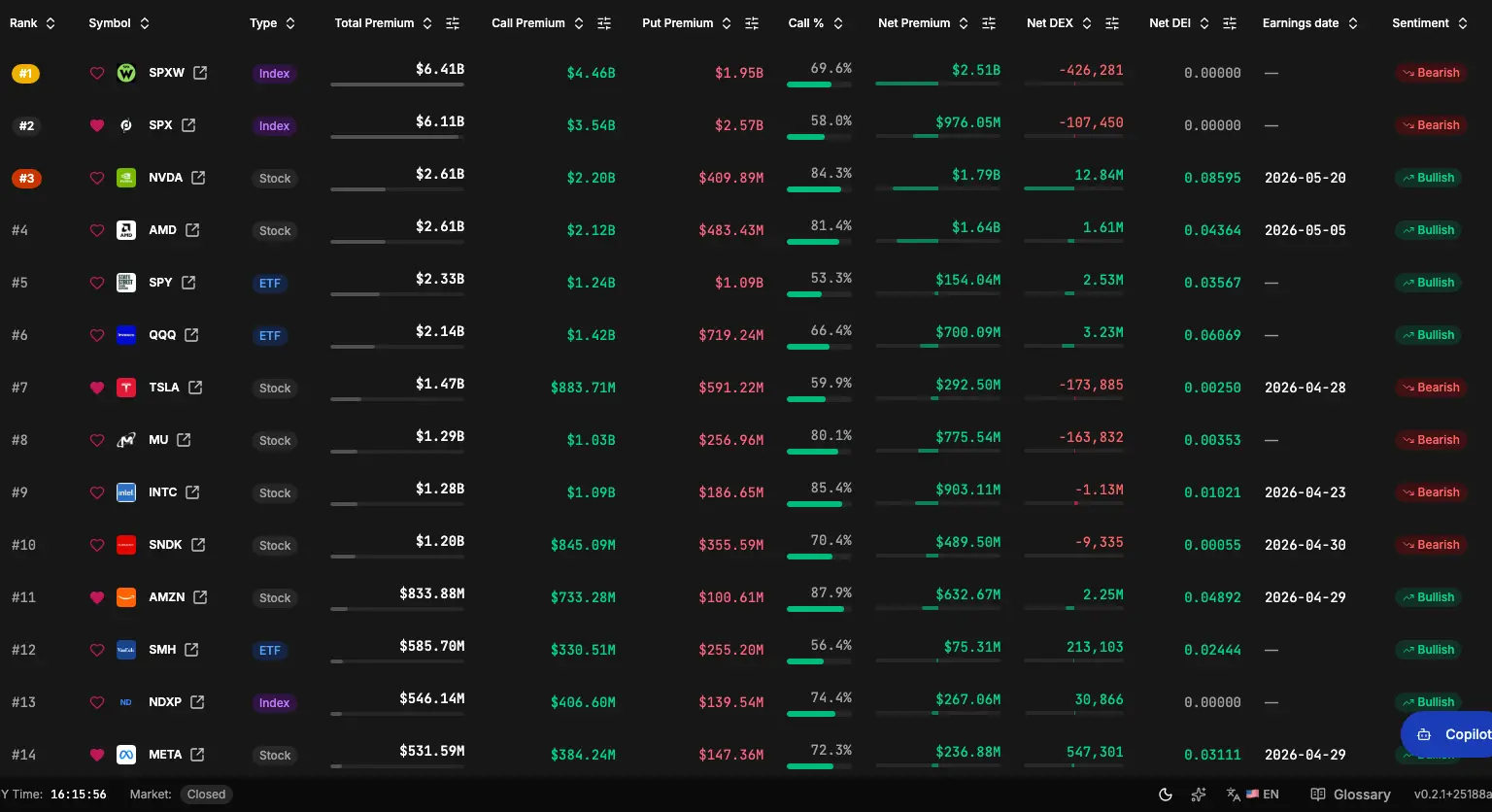
Symbol inspection drawer (flow, positioning, GEX, volatility, and chain context for the selected name):
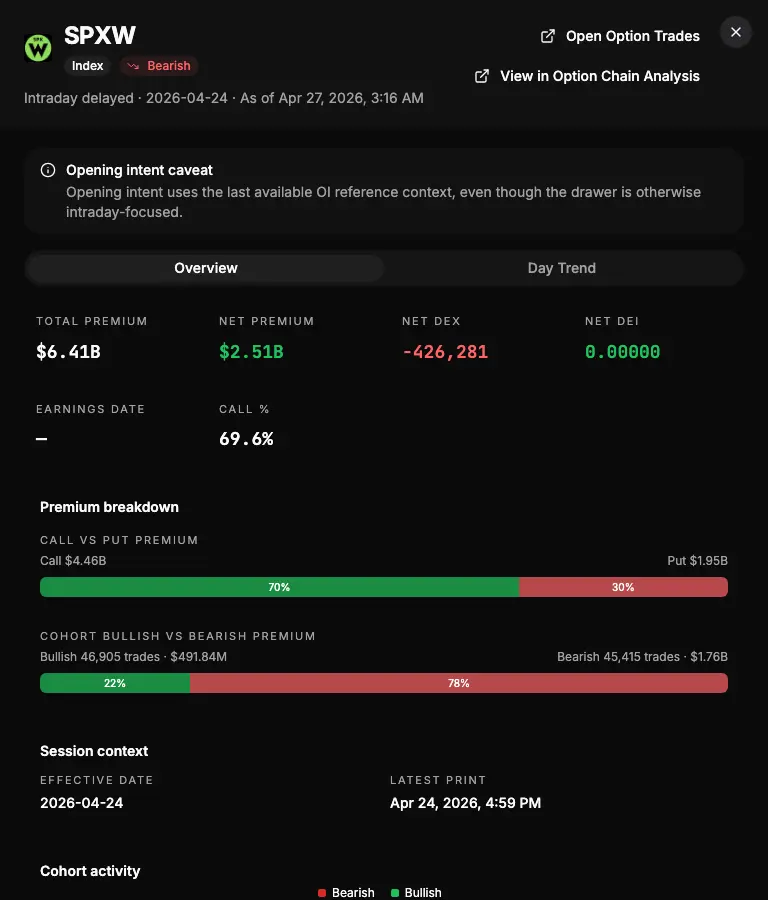
What you see
The app is built around an as-of session date for the flow cohort. Rank and columns reflect that date’s symbol-day aggregates. Typical columns include rank, symbol, type (e.g. ETF, index, stock), sentiment, total premium, call %, net put premium, DEX, and DEI—so you can scan leaders by size, direction, and delta impact.
- Symbol lookup — Type a ticker in the toolbar to open the symbol inspection drawer (same public navigation surface as clicking a row).
- Table — A ranked, column-rich view; exact sort and filter behavior depends on tier (see below).
- Symbol drawer — Overview for the selected symbol and date, a Flow view for per-symbol daily flow, Positioning for OI context, plus GEX, Vol, and Chain tabs for chain-structure analysis that used to be described as standalone Option Chain Analysis.
- Open Option Trades — From the drawer header, jump to Option Trades in a new tab with the same symbol in the URL. Available to all tiers; the table does not duplicate a separate per-row “flow” link—drawer → Option Trades is the main handoff.
- AI summary (optional) — When enabled, generate or refresh a synthesis (takeaways, conclusion with stance and confidence, risks) from the current view. May require entitlement.
- Download CSV — Export for subscribers where available.
Ranks for filtered views are meant to reflect filtering against the full per-date symbol-day cohort first, then ordering—so “top under these conditions” stays meaningful, not a shallow slice filtered after the fact.
Public preview, public drawer, premium controls
Symbol-level analysis is designed with a clear boundary:
- Default list preview — Guests and free users see the canonical preview ranking for the app’s preview contract, without needing a subscription to browse the surface.
- Symbol drawer — Opening a symbol, switching Overview vs Day trend, refreshing drawer data, and deep-linking into drawer state are part of the public navigation experience.
- Premium-side controls — Changing list sort, submitting symbol or filter changes that move off the preview request, advanced filters (e.g. filter popover with numeric range bounds on premium/DEX/DEI columns), date and other server-backed list mutations where gated, premium drawer detail fetches, and CSV export are paid (or otherwise entitled) interactions, enforced in the app and on the server—not merely client-side nags.
In short: you can see the ranked story and open any symbol’s evidence path without paying; you unlock full workflow—custom sorts, full filter sets, and export—on subscription.
Filters and table (premium when gated)
Quick filters
Where your tier allows, you can typically adjust:
Toolbar with session date, quick filters, and the ranked grid:
- Date — Session date (defaults to the latest available in the system).
- Type — ETF, index, or stock.
- Sentiment — All, bullish, or bearish flow tone (aligned with net-DEX list rules at high level).
- Min premium — Thresholds such as
All → $250K → $1M → $5M → $10M → $25M → $50M → $100M(values as shipped in the product).
Numeric range filters
From the Filters popover, set min/max on columns such as total call premium, total put premium, net put premium, total premium, net DEX, and net DEI. Active filter chips should appear under the toolbar when applied.
Column sorting from headers may be gated for unpaid users (sort attempts can be blocked before local state changes), while paid users can reorder to hunt leaders by premium, call %, net put, DEX, or DEI.
Where to find it
In TradingFlow, use Rank → Symbols, or go directly to /app/rank/symbols. Older links to /app/market-rank and /app/symbol-level should redirect here.
Related workflows
- Option Trades — Trade-level flow for a symbol; use the drawer’s Open Option Trades handoff to land with the symbol already set in the app.
- Option Chain Analysis — Gamma, cross-sectional vol, OI, and per-symbol chain depth now lives inside this Rank Symbols tab and its inspection drawer.
The standalone cross-symbol OI change rank app has been retired; for OI context on a single symbol inside the app, use the Positioning tab in the symbol inspection drawer instead of looking for a separate OI-rank listing.
Related Articles
Contract-level analysis in the Rank workbench
Contract-level analysis is the Contracts tab of the Rank workbench. It ranks specific option contracts with intraday flow, retained snapshot dates, OI/volume context, exact-contract inspection, and Option Trades handoff.
Option Trades: Real-Time Option Flow, Unusual Activity & Block Trades
Watch live option flow in TradingFlow: real-time tape, sentiment, DEX, filters for unusual trades, blocks, and premium flow.
GEX Screener: Live Gamma Exposure, Call Walls & Put Walls
Use TradingFlow's GEX screener inside Rank Symbols to inspect gamma exposure, call walls, put walls, volatility, OI positioning and option-chain context in real time.