Official template · advanced · Option flow
See when option premium traded and where it went.
See where the session’s option premium actually went without scrolling the raw tape.
The report UI is recreated from the test app's Sep 25, 2026 session, not a live screen. A historical example with music; no narration.
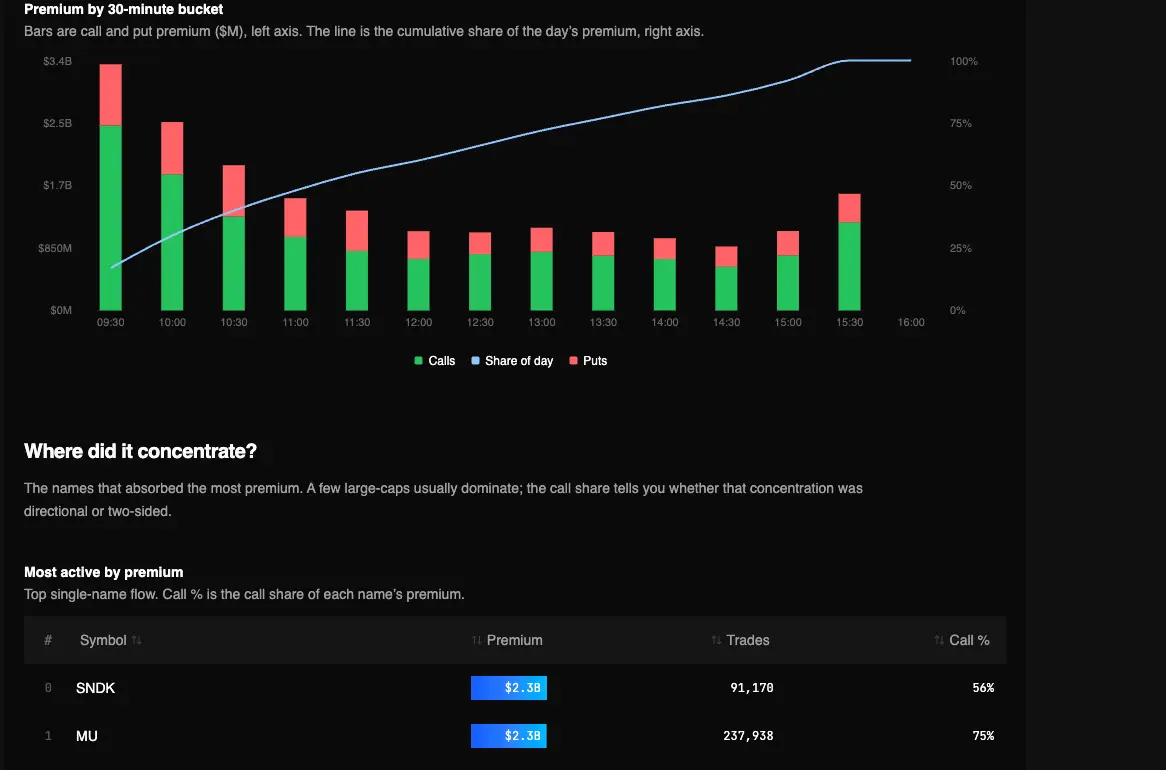
Captured Sep 23, 2026 on testapp.tradingflow.com. This is a historical example; results on this page do not refresh. Swipe across the image to inspect its columns.
- 01Session tape
- 02Aggregate time + names
- 03Flow and largest prints
A completed-session read; Option Trades is the live workbench.
Read the output
- 01Where session option premium went, by name and time.
- 02The single biggest tickets in that session.
- 03Composition of the tape as a recap, not a streaming squawk.
Keep in mind
It is not Unusual Whales–style Discord/audio alerts.
How to read it
From report to evidence01
Run the tape recipe
Open Daily Option Flow in Cookbooks for the latest completed session.
02
Note timing and size
Ask when premium hit and which tickets dominated. Size without context is still noise.
03
Inspect on Option Trades
Handoff a contract or symbol into the live or historical tape when you need side, DTE, and Vol/OI.
Method and limitations
A paid Cookbook report of the session tape: premium timing, which names absorbed it, and the largest tickets. Use it to audit the day, then open Option Trades for the live feed. Official app template: Daily Option Flow — The Tape.
What the report computes
- Where session option premium went, by name and time.
- The single biggest tickets in that session.
- Composition of the tape as a recap, not a streaming squawk.
What it does not claim
- It is not Unusual Whales–style Discord/audio alerts.
- A large ticket is not automatically an opening whale or a directional bet.
- It does not reconstruct multi-leg spreads into one strategy object.
The recipe reads OptionTrade premium, time, and size directly — the same tape ontology as Option Trades — then packages it as a session report instead of a scrolling feed.
Frequently asked questions
- Is this the live Option Trades feed?
- No. Option Trades is the workbench tape. This recipe is a session report of where premium went. The CTA opens the Cookbook, not /app/option-trades.
- Can I use it as trade alerts?
- No. It recaps a session. It does not push Power Alerts or claim a win rate on copied prints.
Related recipes
More learning resources
The public page explains the report. Run the official template in TradingFlow for a selected completed market session.
Open Option tape