配方详情目前以英文提供,官方报告可在 TradingFlow 应用中打开。
Official template · advanced · Flow scanner
Screen unusual contracts with your own thresholds.
Screen unusual contracts by volume versus the book, not by a vendor’s opaque UOA score.
The report UI is recreated from the test app's Sep 25, 2026 session, not a live screen. A historical example with music; no narration.
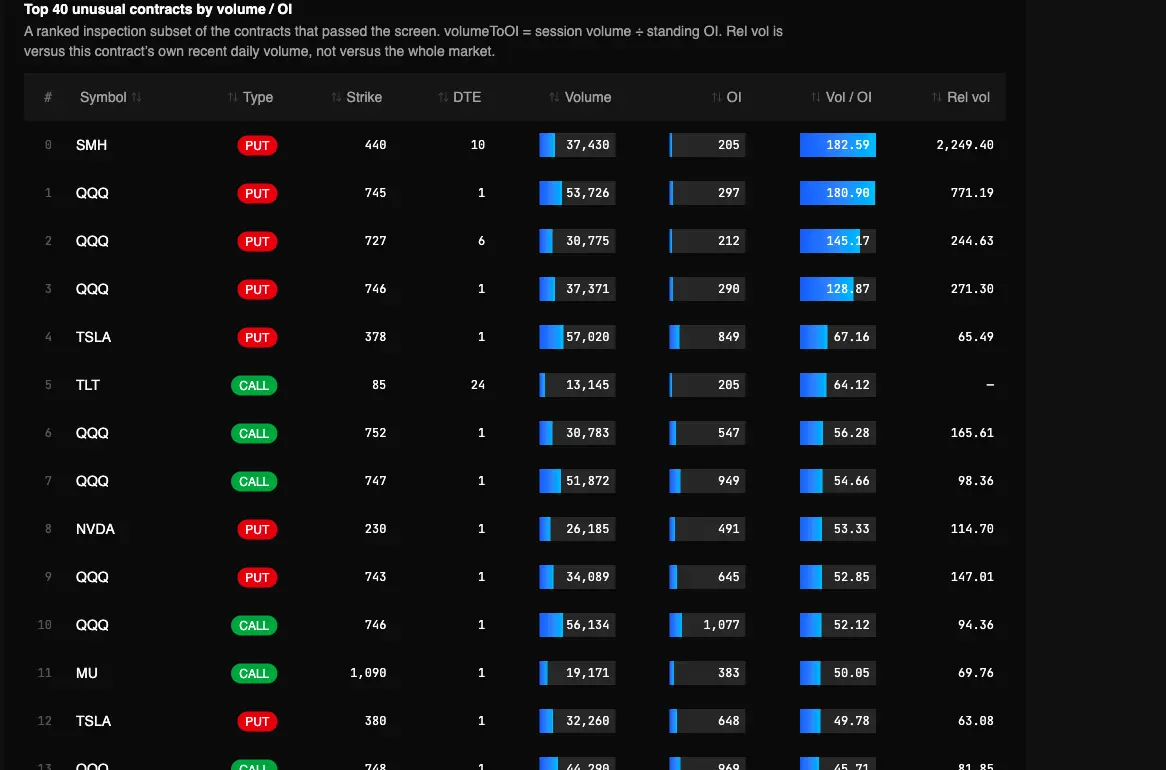
Captured Sep 23, 2026 on testapp.tradingflow.com. This is a historical example; results on this page do not refresh. Swipe across the image to inspect its columns.
- 01User thresholds
- 02Filter contract activity
- 03Ranked inspection set
The report shows a bounded subset, not every qualifying contract.
Read the output
- 01volumeToOI = session contract volume ÷ standing open interest on the chain snapshot.
- 02relativeVolume versus that same contract’s recent daily volume when at least five prior snapshots exist.
- 03A ranked board with reader-tunable floors (vol/OI, rel vol, volume, OI, max DTE).
Keep in mind
It is not a live unusual-print tape. Live UOA still lives on Option Trades.
How to read it
From report to evidence01
Run the screener
Open Unusual Options Activity Screener in Cookbooks. Tune vol/OI and relative-volume floors if the default board is too loud or too quiet.
02
Read vol/OI first, then rel vol
Vol/OI asks how large today is versus the standing book. Rel vol asks how large today is versus this contract’s own tape. A blank rel-vol cell means not enough history, not a zero.
03
Handoff to the tape
Anything you might trade still needs Option Trades and the chain. The recipe is the shortlist, not the fill.
Method and limitations
A paid Cookbook that ranks chain-snapshot contracts on volume/OI and, when history exists, relative volume versus that contract’s own recent daily volume. Thresholds are tunable. It does not name a trader or fire an alert. Official app template: Unusual Options Activity Screener.
What the report computes
- volumeToOI = session contract volume ÷ standing open interest on the chain snapshot.
- relativeVolume versus that same contract’s recent daily volume when at least five prior snapshots exist.
- A ranked board with reader-tunable floors (vol/OI, rel vol, volume, OI, max DTE).
What it does not claim
- It is not a live unusual-print tape. Live UOA still lives on Option Trades.
- High volume/OI is not proof of a new whale, opening status, or a next-session move.
- 0DTE is excluded. An EOD 0DTE print is a different job.
UOA here is configurable volumeToOI plus relative volume versus the same contract’s own history — concepts.md’s screening technique, not a baked “smart money” score.
Frequently asked questions
- Is this the live UOA tape?
- No. This is a completed-session chain screen. Live prints, sweeps, and filters stay on Option Trades.
- Does a high volume/OI mean someone opened a position?
- Not from this report. Volume/OI is a ratio. Rolls, hedges, and closing prints can all print the same number.
Related recipes
More learning resources
The public page explains the report. Run the official template in TradingFlow for a selected completed market session.
Open UOA screener