Getting Started with TradingFlow
Your first five minutes: sign in, start a free trial, and pick the right tool to start tracking the options market.
TradingFlow brings institutional-grade options-flow analytics to everyday traders. Instead of staring at price charts, you watch what big money is actually doing — the real option trades hitting the tape, ranked and filtered so the standout activity rises to the top. This guide gets you oriented in about five minutes: how to sign in, how the free trial and paid plan work, where everything lives in the app, and which tool to open first.
What TradingFlow is, in one paragraph
TradingFlow is a live and historical window into the options market. It shows you individual option trades as they happen, rolls them up into rankings so you can discover unusual activity, and layers in structural context (open interest, Greeks, dealer positioning) so you understand not just what traded but why it might matter. If a term here is unfamiliar, don't worry — every concept is explained in its own chapter, and we link to those as we go. (New to options jargon? Start with Options & Flow Concepts.)
Signing in
Signing in is the single front door to everything personal and premium.
- Use the Sign in button in the top-right corner of the app.
- Your account is tied to your email, so your watchlists, preferences, and plan follow you on any device.
- Signing in on a shared device cleanly ends the previous session, so you're never accidentally acting as someone else's account.
Once you're signed in, you can create and save watchlists — your personal collections of tickers — even before you upgrade.
The free trial and paid plan
TradingFlow uses a simple freemium model: a genuinely useful free preview for everyone, with the high-value pieces unlocked by a paid plan.
What everyone gets (free preview):
- A public preview of each tool — typically the top results or a basic view.
- Symbol search and the ability to browse around.
- Detail panels that open for everyone (though the premium content inside stays locked until you upgrade).
What a paid plan unlocks (premium):
- Live, real-time data — the trade tape updating as it happens.
- Custom filters and sorting to slice the data your way.
- Saved views and full watchlist scoping across tools.
- Exports and deeper detail in inspection panels.
You can start a free trial to experience the premium tier, and during the trial you have full paid access. Live data and the deepest detail are paid features — that's the core value of TradingFlow — so they appear only once your paid status is confirmed.
Your first five minutes
A good first session: sign in, start your free trial, open one of the two core tools, and add a watchlist of the tickers you follow. From then on, every view can be scoped to just those names. See Watchlists & Filters for how to build and apply them.
A tour of the app layout
Here's the app with everything in its place. Use this image to learn the furniture — the individual tools get their own chapters.
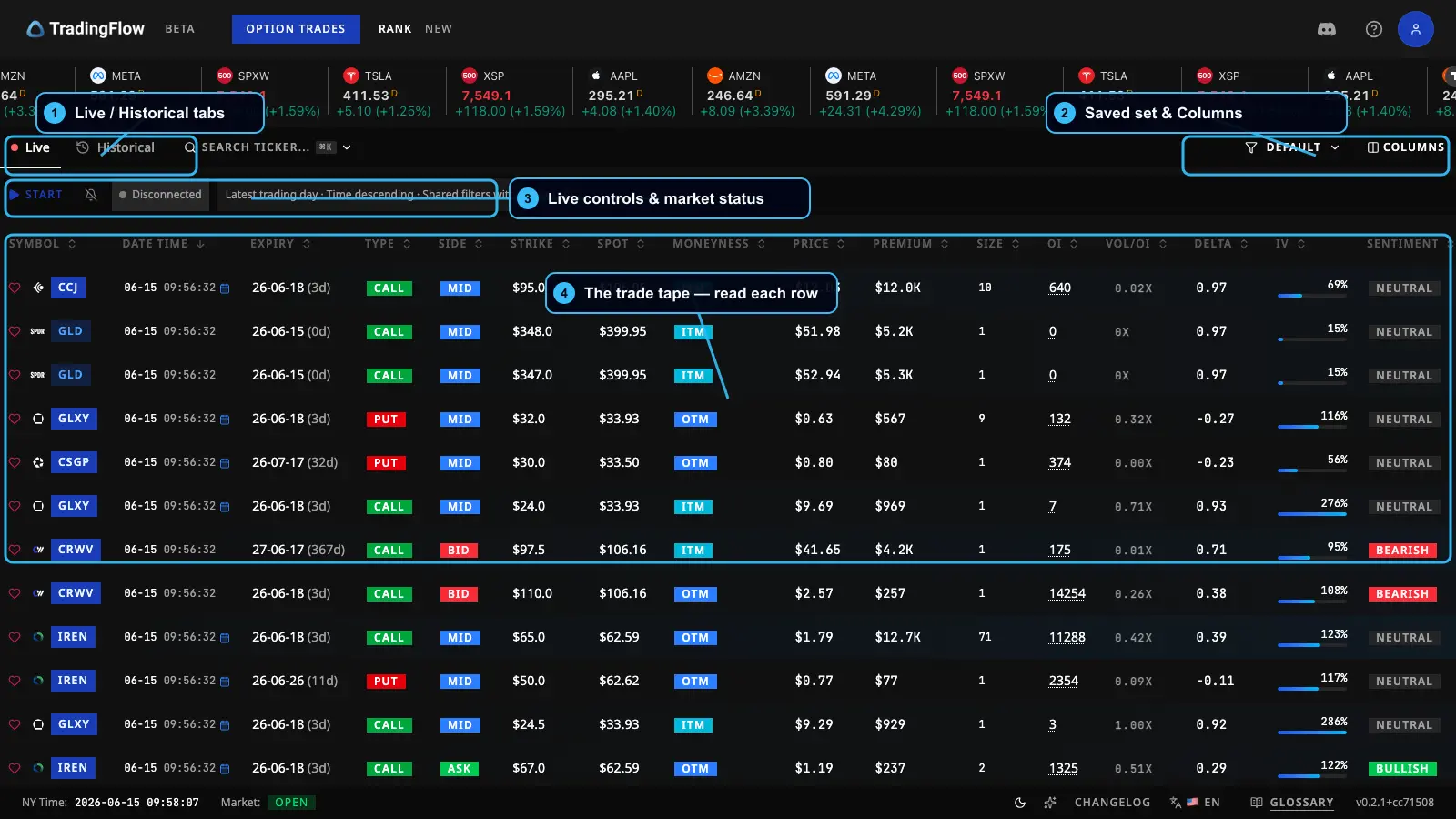 The Option Trades screen, used here to point out the global layout that's the same everywhere.
- Top navigation — your two main destinations: Option Trades (the live trade tape) and Rank (ranked discovery, with Contracts and Symbols views).
- Symbol ticker tape — a running strip of symbols and quotes so you always have market context at a glance.
- Account avatar — top-right; your profile, plan, and sign-out live here.
- Footer — handy reference links: the Glossary (definitions for every term), the Changelog (what's new and recently shipped), and the language toggle (switch between English and 中文).
You'll also occasionally see a brief "What's New" pop-up for signed-in users, highlighting recently added features. You can dismiss it for the session, and it never interrupts sign-in or upgrade.
Which tool should I use?
The two core surfaces answer different questions. Use this guide to pick.
- Want the live trade tape and fine-grained filtering? Open Option Trades — the flow of individual option trades, live or historical. Live link: Option Trades.
- Want ranked discovery of unusual activity at the contract level? Open Rank Contracts — standout single option contracts. Live link: Rank Contracts.
- Want to see which underlying stocks are active overall? Open Rank Symbols — activity rolled up to the underlying, plus structural context like GEX and open interest. Live link: Rank Symbols.
A simple rule of thumb: Option Trades is for watching the flow, and Rank is for discovering where to look. Most traders bounce between the two.
What to do next
You're oriented. Pick your starting point:
- New to the lingo? Read Options & Flow Concepts first.
- Ready to watch the market move? Jump into Option Trades.
- Want to scope everything to your favorite names? Set up Watchlists & Filters.