Using Rank: Symbols
Scan a ranked leaderboard of underlying names by options flow, read each symbol's GEX environment and volatility, and inspect any name in a drawer before handing it off to Option Trades.
The Symbols view of the Rank workbench is a ranked leaderboard of underlying names — stocks, ETFs, and indices. Where the Contracts view answers "which exact option contracts are hot?", Symbols answers a higher-level question: "which names are seeing the most interesting flow right now?"
Both views are built from the same session snapshot of the day's flow, so they stay consistent and connected. You can scan symbols, drill into a name, and continue into its contracts without losing your place. Open it live at Rank Symbols.
Note: The old standalone Option Chain Analysis tool now lives inside this Symbols view and its drawer (the GEX, Vol, Positioning, and Chain tabs). There is no separate page to find — it's all here.
The Symbols view at a glance
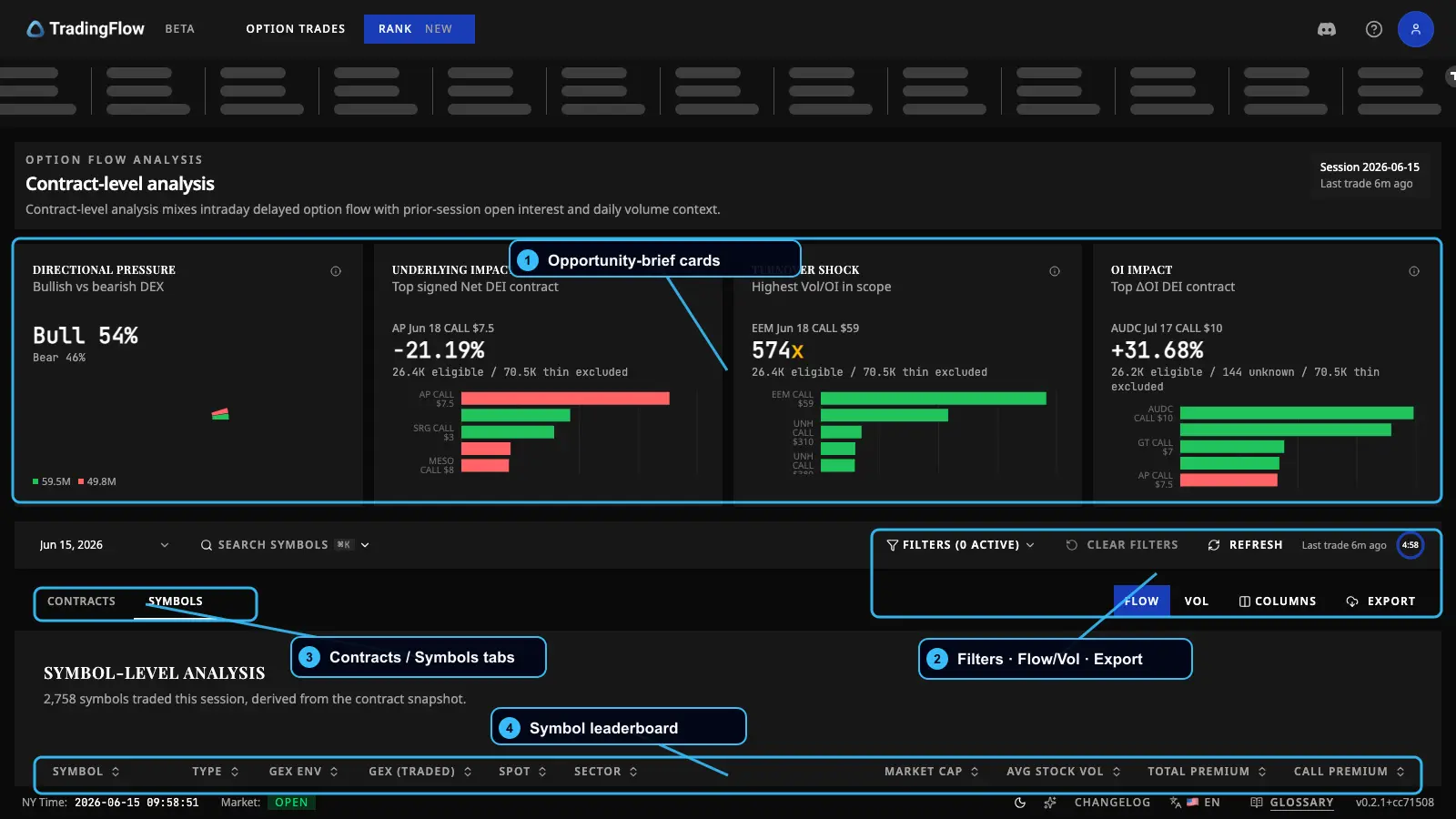 The Symbols leaderboard: opportunity-brief cards on top, the ranked table below, with filters and export in the toolbar.
- Opportunity-brief cards — at-a-glance summaries of the currently filtered cohort (the standout names by direction, impact, and turnover).
- Filters + Flow/Vol toggle + Export — narrow the list, switch column presets, and export what you see (paid).
- Contracts / Symbols tabs — switch between contract-level and symbol-level ranking. You're on Symbols.
- Symbol leaderboard — the ranked table of names, flow signal leading from the left.
Because Symbols and Contracts share one picture of the day, any watchlist or single-symbol scope you apply here also flows through to the Contracts view. (For watchlists and filters in depth, see Watchlists and Filters.)
Reading the symbol leaderboard
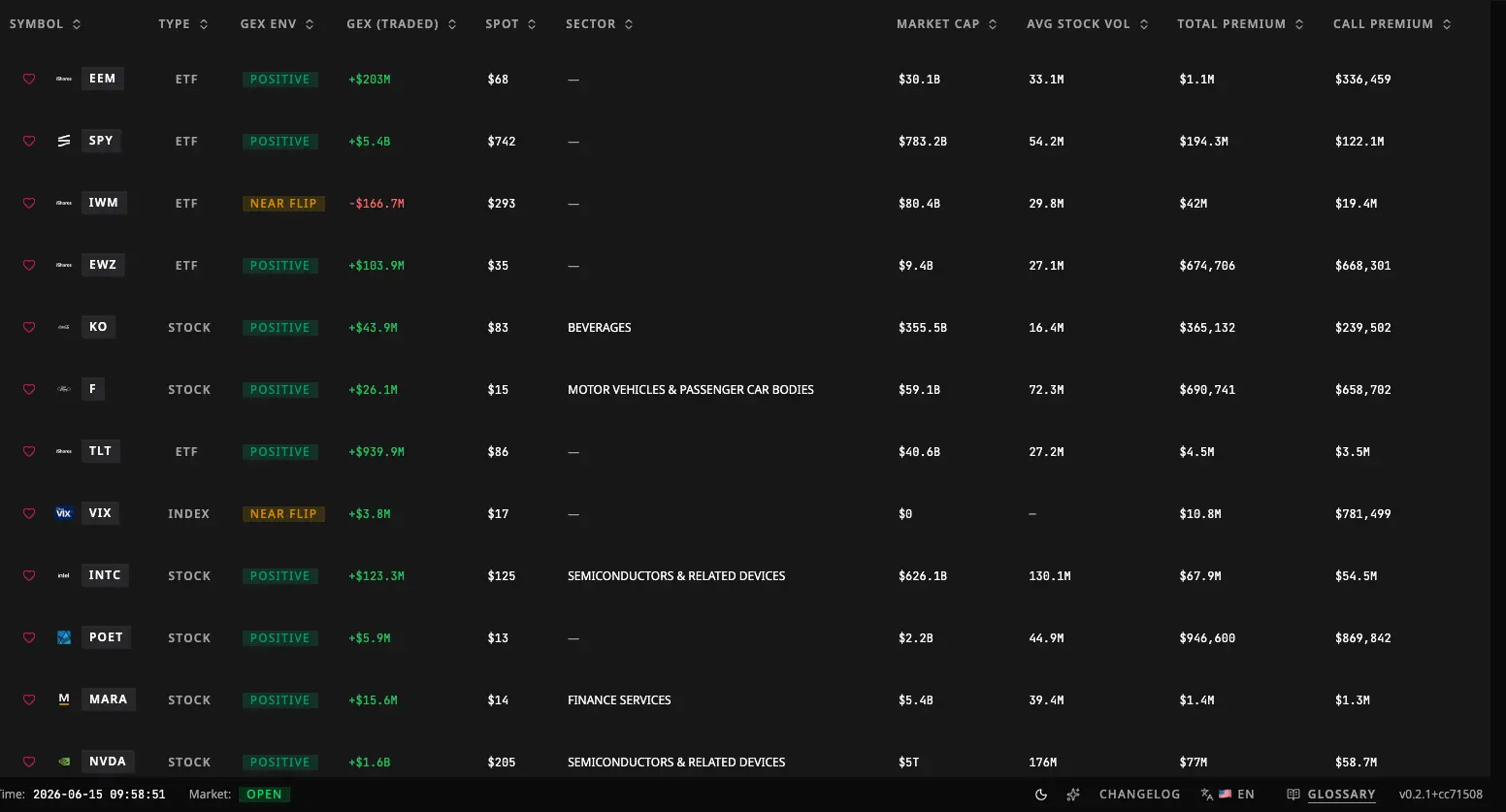 The table is ordered "trader-first": flow signal leads from the left, structure and reference data trail to the right.
The columns are grouped, roughly left to right:
Flow headline (the signal)
- Premium — total and net premium traded in the name's options. Big premium = big money at work.
- Net DEX — the net directional lean of the flow (bullish positive, bearish negative). See DEX in Greeks & GEX.
- Net DEI — how large that directional flow is relative to the name's typical volume, shown as a size. It lets you compare a mega-cap and a small-cap fairly. (DEI is always read as a magnitude; direction comes from Net DEX and Sentiment.)
- Sentiment — a simple bullish / bearish label from the sign of the net flow. A balanced name shows no side.
- Call % — the share of premium spent on calls. High Call % leans bullish; low leans bearish.
You'll also find bullish DEI, bearish DEI, call/put premium, and trade counts here for a fuller read of how the day split.
Structure (the backdrop)
- GEX Environment — a regime badge describing the name's gamma backdrop (more on this below). This is the only GEX column on the table; the numbers behind it live in the drawer's GEX tab.
Volatility (where IV is rich or cheap)
- A set of implied-volatility metrics: IV30 (30-day IV), at-the-money IV, IV Rank, IV percentile, skew, term-structure slope, and butterfly. Useful for spotting where volatility is unusually high or low across names.
Reference (context)
- Sector, market cap, average stock volume, and earnings — static context to frame the name.
The list mixes recent intraday flow (which drives the ranking) with prior-period structure (open interest, daily volume from the latest snapshot). It's not purely real-time or purely end-of-day, and the app says so — don't misread either part.
Flow vs Vol column presets
The toolbar has a Flow / Vol toggle:
- Flow preset (default) leads with the flow-headline columns above.
- Vol preset hides the flow columns and surfaces the volatility metrics plus light identity/context — handy when you're screening purely for volatility.
Column layout is session-only: a fresh visit resets to the default.
Inspecting a symbol: the drawer
Click any row to open the symbol inspection drawer — a detail panel for that one name. The shell and most tabs are instant, because they draw on the session picture already loaded in your browser.
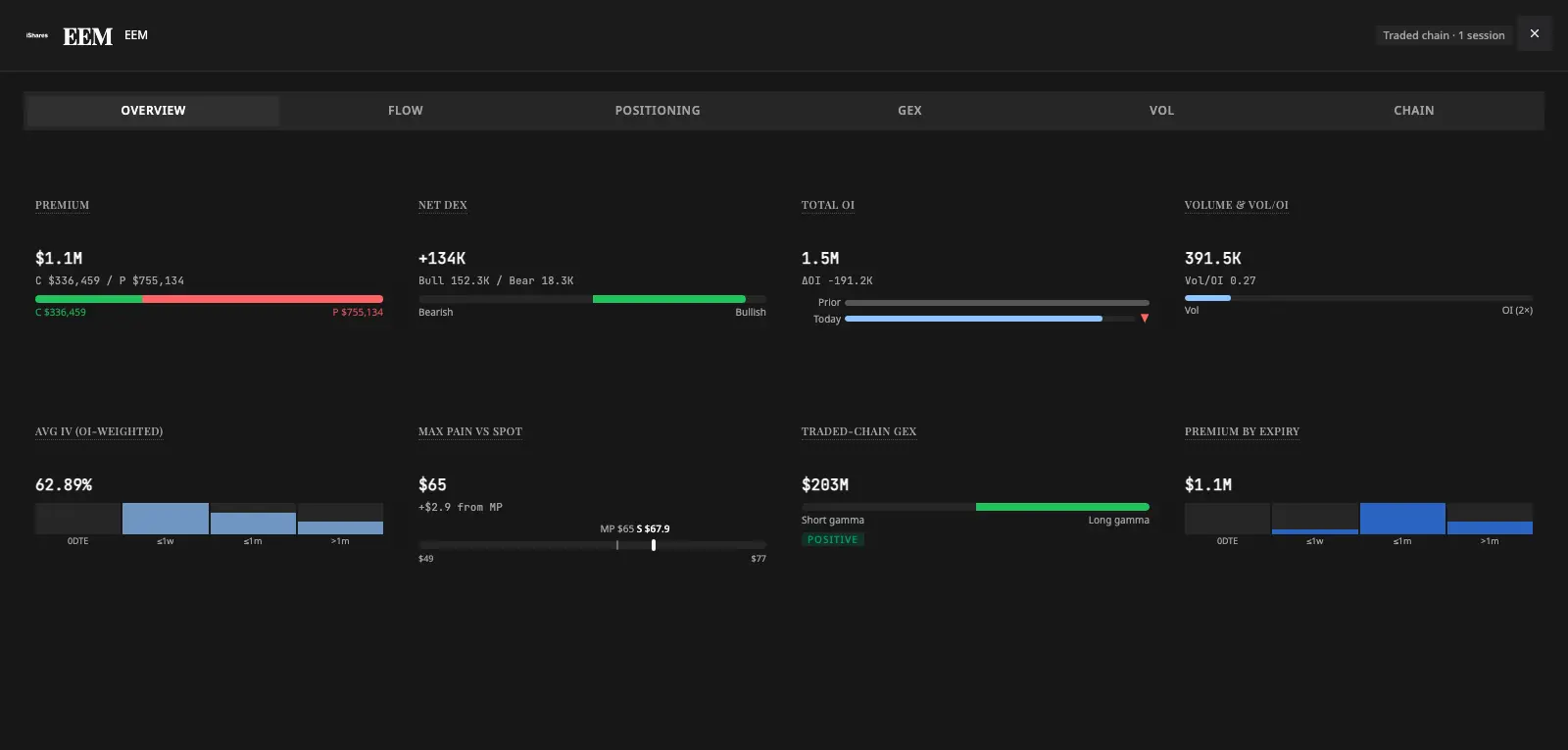 The symbol drawer with its tabs: Overview, Flow, Positioning, GEX, Vol, and Chain.
The tabs:
- Overview — the headline read for the selected symbol and date. (Structural — instant, free.)
- Positioning — open-interest context for the name. (Structural — instant, free.) For more on OI, see Option Chain and OI.
- GEX — the full-chain dealer-gamma detail: net GEX, the zero-gamma flip level, open-interest walls, the GEX ladder, and 0DTE structure. (Structural — instant, free.)
- Vol — IV30, IV Rank, IV percentile, and related volatility context. (Structural — instant, free.)
- Chain — the traded-chain structure for the name, which then auto-loads live bid/ask quotes. (The quotes here are intentionally public — guests and free users see them too.)
- Flow — the per-symbol "day trend" flow evidence. (This is a paid tab: it sits behind a "Load" action and is fetched only when you choose to.)
So the structure side of the drawer (Overview, Positioning, GEX, Vol) is instant and mostly free; the Chain quotes are public; and the deep Flow tab is the paid piece. The drawer and its open tab are shareable by link, so you can send a colleague straight to a symbol opened to, say, its GEX view.
A simple flow
GEX Environment, briefly
The GEX Environment badge labels the gamma regime behind a name — the market-maker positioning backdrop. At a high level:
It's a quick way to ask "is this name likely to be pinned and calm, or trendy and explosive?" before you dig in. The full mechanics — gamma, walls, and squeezes — are explained in Greeks & GEX.
A couple of things to know: GEX Environment is a paid overlay, it's left out of the free preview, and it only applies to the latest available trading date (for older dates it's cleared with an explanation, since a stale gamma label would be misleading). The same GEX vocabulary is used in Option Trades, so the read stays consistent across the product.
Free preview vs paid
The boundary is the same as the Contracts view — the look is free; changing and going deep is paid:
Everyone (guests and free users) can:
- Browse the default ranked symbol leaderboard and page through it.
- Open the symbol drawer shell and its structural tabs (Overview, Positioning, GEX, Vol, Chain).
- See live bid/ask quotes in the Chain tab — a deliberate public exception.
Paid users additionally can:
- Change the sort and apply filters (including the advanced filter panel and watchlist/symbol scope).
- Load the drawer's Flow tab.
- Choose a specific trading date and receive live updates during market hours.
- Export the cross-filtered symbol cohort.
- Use the Open in Option Trades handoff.
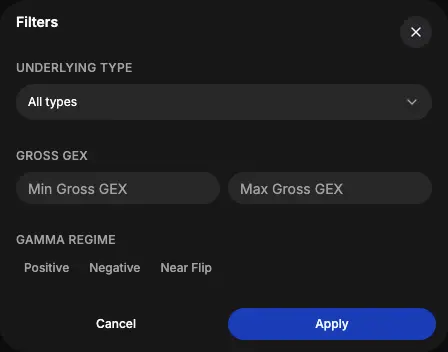 The filters panel — set min premium, type (ETF / index / stock), sentiment, and numeric ranges on premium, DEX, and DEI. Applying filters is a paid action.
Any paid-only action you attempt as a free user routes through a single prompt to sign in or upgrade — it never silently fails.
Handoff to Option Trades
When a name stands out and you want the trade-by-trade tape, the drawer header has an Open in Option Trades control. For paid users it carries the symbol forward into Option Trades — already scoped to that name, in the right live or historical mode. Guests land on the public Option Trades preview. Only the symbol identity is carried forward; nothing is duplicated onto the rank rows.
What to do next
You now know how to scan names, read each one's flow and gamma backdrop, and inspect any symbol before acting. Next, learn to shape the leaderboard to exactly what you care about in Watchlists and Filters — or jump straight to the tape with Option Trades.