Official template · advanced · Option flow
Read the execution codes behind the tape.
See whether the session’s premium was urgency (sweeps) or size (single fills), without confusing activity codes for inventory.
The report UI is recreated from the test app's Sep 25, 2026 session, not a live screen. A historical example with music; no narration.
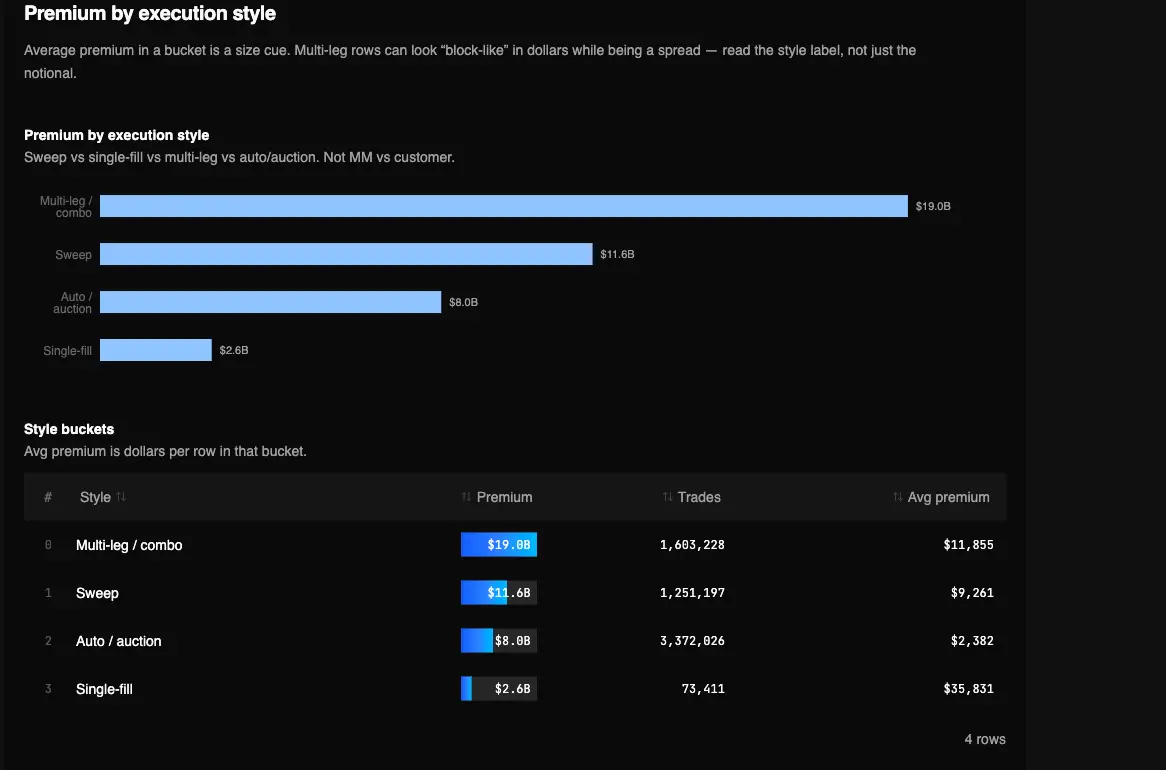
Captured Sep 23, 2026 on testapp.tradingflow.com. This is a historical example; results on this page do not refresh. Swipe across the image to inspect its columns.
- 01Raw activity codes
- 02Exclusive buckets
- 03Style + code detail
Sweep, single-fill, multi-leg and auction are execution styles.
Read the output
- 01Sweep share: stored SWEEP / IntermarketSweep, or trade_count > 1.
- 02Single-fill share: remaining trade_count = 1 prints (the product Block filter).
- 03Multi-leg / combo and auto/auction buckets, plus the raw activity codes that absorbed the most premium.
Keep in mind
Activity type is not dealer inventory, dark pool, TRACE, or Congress flow.
How to read it
From report to evidence01
Run the style read
Open Execution-Style Read — Sweeps vs. Blocks in Cookbooks.
02
Read sweep share, then raw codes
Sweep share is urgency plus collapsed multi-fill rows. The code table is what the feed stored (SLAN, CBMO, …) so a vendor glossary can be checked against reality.
03
Filter live on Option Trades if you act
The same Sweep / Block toggles exist on the tape. This cookbook is the session recap of those rules, not a live squawk.
Method and limitations
A paid Cookbook of completed-session premium by execution style, using the same sweep / multi-leg / auto rules as Option Trades filters. Single-fill is what the Block filter actually matches. CBMO is multi-leg, not a dark-pool block. Official app template: Execution-Style Read — Sweeps vs. Blocks.
What the report computes
- Sweep share: stored SWEEP / IntermarketSweep, or trade_count > 1.
- Single-fill share: remaining trade_count = 1 prints (the product Block filter).
- Multi-leg / combo and auto/auction buckets, plus the raw activity codes that absorbed the most premium.
What it does not claim
- Activity type is not dealer inventory, dark pool, TRACE, or Congress flow.
- CBMO and related codes are multi-leg / combo, not “the block.”
- It does not reconstruct multi-leg strategy as one coordinated position.
Sweep vs single-fill buckets use the same Option Trades filter rules (sweep codes or trade_count > 1 vs trade_count = 1); CBMO stays in the multi-leg bucket.
Frequently asked questions
- Is a “block” here a dark-pool print?
- No. The product Block filter is trade_count = 1 — a single aggregated fill. There is no dark-pool dataset on this tape.
- Why is CBMO not listed as a block?
- CBMO is a multi-leg / combo activity code in the Option Trades filter contract. Large notional does not make it a block.
Related recipes
More learning resources
The public page explains the report. Run the official template in TradingFlow for a selected completed market session.
Open Execution-style detail