
Getting Started with TradingFlow
Your first five minutes: sign in, start a free trial, land on the Home hub, and pick the right tool to start tracking the options market.
TradingFlow brings institutional-grade options-flow analytics to everyday traders. Instead of starting with price charts alone, you study what option traders are actually doing: the trades hitting the tape, the contracts rising in the rankings, and the option-chain structure around them. This guide gets you oriented in about five minutes: how to sign in, how the free trial and paid plan work, where everything lives in the app, and which tool to open first.
What TradingFlow is, in one paragraph
TradingFlow is a live and historical window into the options market. It shows you individual option trades as they happen, rolls them up into rankings so you can discover unusual activity, and layers in structural context (open interest, Greeks, dealer positioning) so you understand not just what traded but why it might matter. If a term here is unfamiliar, don't worry — every concept is explained in its own chapter, and we link to those as we go. (New to options jargon? Start with Options & Flow Concepts.)
Think of the product as a research workflow, not a magic signal:
- Discover where activity is unusual.
- Inspect the exact symbol or contract.
- Validate the individual trades behind the ranking.
- Compare freshness — live flow versus slower chain data like open interest.
- Decide what you still do not know before acting.
That last step matters. A large option trade can be a directional bet, a hedge, a spread leg, or a closing trade. TradingFlow helps you collect evidence; it does not remove the need for judgment or risk management.
The research workflowTradingFlow is a workflow, not a one-click signal — climb left to right, every time.
Signing in
Signing in is the single front door to everything personal and premium.
- Use the Sign in button in the top-right corner of the app.
- Your account is tied to your email, so your watchlists, preferences, and plan follow you on any device.
- Signing in on a shared device cleanly ends the previous session, so you're never accidentally acting as someone else's account.
Once you're signed in, you can create and save watchlists — your personal collections of tickers — even before you upgrade.
The free trial and paid plan
TradingFlow uses a simple freemium model: a genuinely useful free preview for everyone, with the high-value pieces unlocked by a paid plan.
What everyone gets (free preview):
- A public preview of each tool — typically the top results or a basic view.
- Symbol search and the ability to browse around.
- Detail panels that open for everyone (though the premium content inside stays locked until you upgrade).
What a paid plan unlocks (premium):
- Live, real-time data — the trade tape updating as it happens.
- Custom filters and sorting to slice the data your way.
- Saved views and full watchlist scoping across tools.
- Exports and deeper detail in inspection panels.
You can start a free trial to experience the premium tier, and during the trial you have full paid access. Live data and the deepest detail are paid features — that's the core value of TradingFlow — so they appear only once your paid status is confirmed.
Your first five minutes
A good first session: sign in, start your free trial, open one of the two core tools, and add a watchlist of the tickers you follow. From then on, every view can be scoped to just those names. See Watchlists & Filters for how to build and apply them.
For class or self-study, keep a small research notebook. For each interesting setup, write one sentence for each prompt:
| Prompt | Example answer |
|---|---|
| What did I notice? | "NVDA calls ranked high by Net DEI." |
| Why might it matter? | "Large directional flow relative to normal volume." |
| What confirms it? | "Aggressive ask-side prints and rising OI tomorrow." |
| What weakens it? | "Mid-market prints, no OI follow-through, or event hedging." |
Your front door: the Home hub
Open the app and you land on Home (/app/home) — every visitor sees the same starting point, whether you're a guest, on a free trial, or paid.
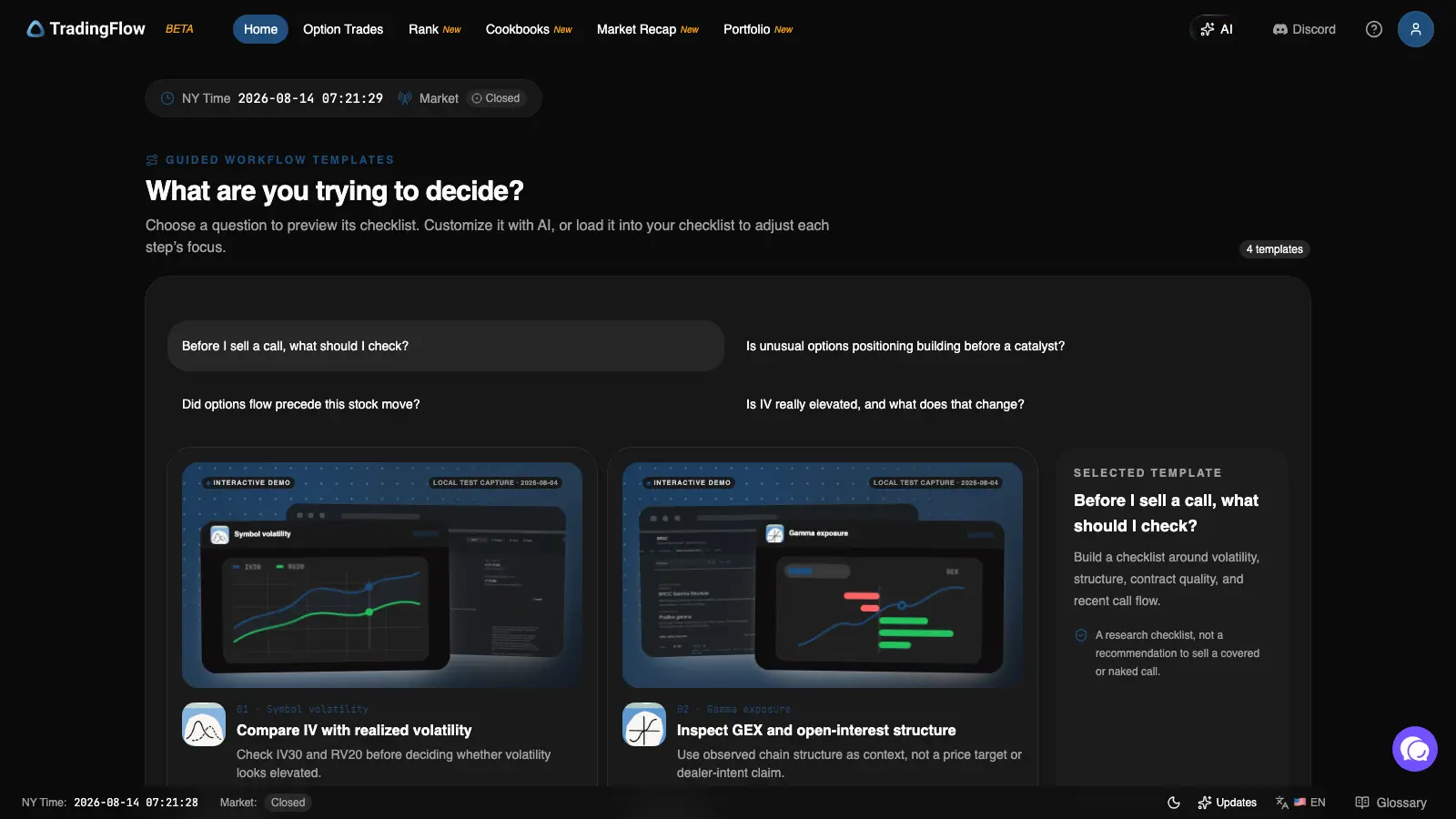 Home opens with a research question, not a marketing page: pick one of four templates and it previews a step-by-step checklist.
Home leads with "What are you trying to decide?" — four common trader questions (for example, "Before I sell a call, what should I check?"), each one a short, ordered checklist of where to look and what to compare. Pick one to preview it, load it into your checklist to work through it step by step, or use it as a model for how to structure your own research. Below the templates, Home also links out to a library of every analysis tool, plus Portfolio, Learn, the Blog, and the Changelog.
You don't have to use Home's checklists — you can go straight to any tool from the navigation bar — but it's the fastest way to see the app's research method in action before you've read a single concept chapter.
A tour of the app layout
Once you're inside a tool, the surrounding chrome is the same everywhere. Use this image to learn the furniture — the individual tools get their own chapters.
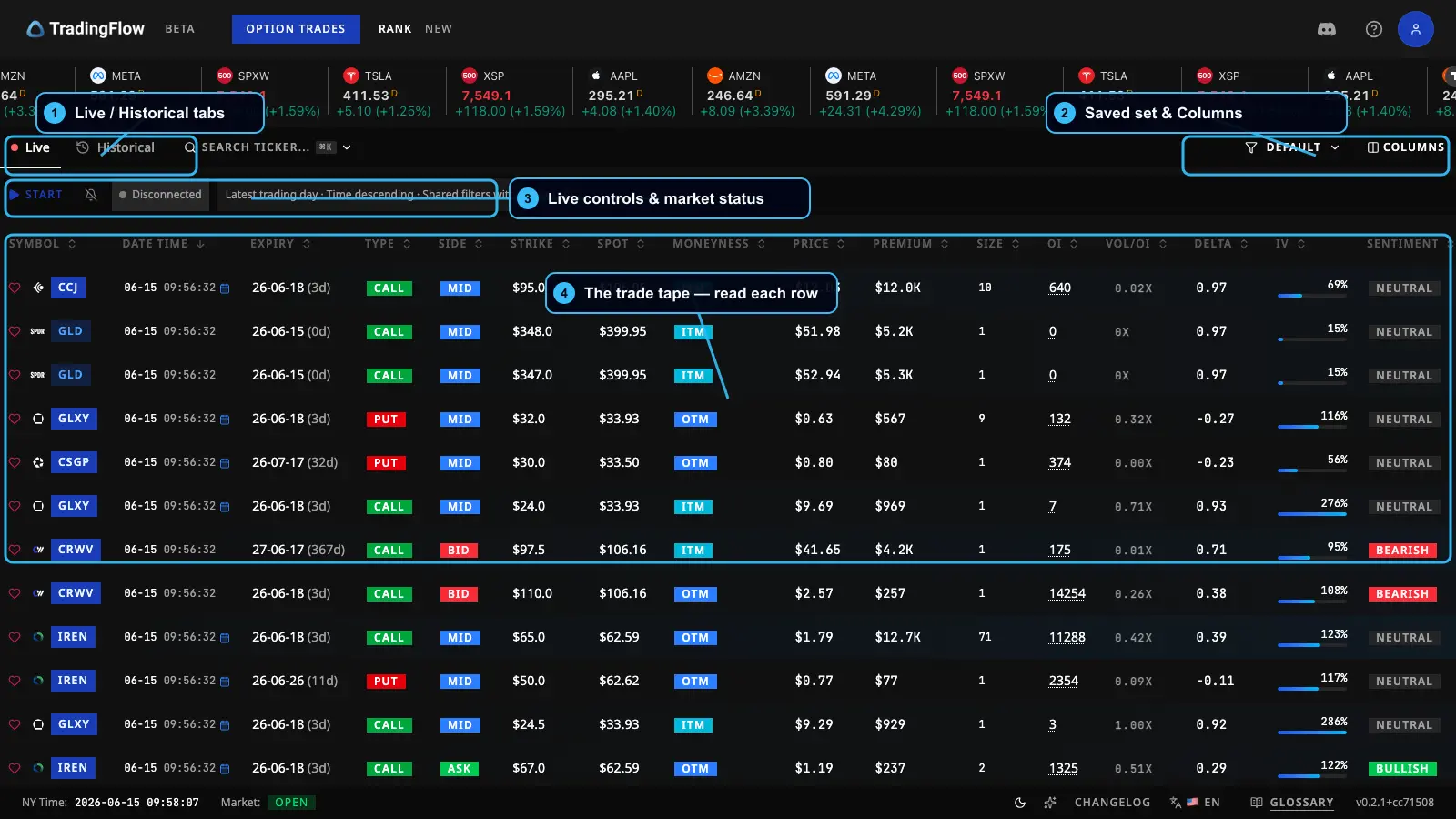 The Option Trades screen, used here to point out the global layout that's the same everywhere.
- Top navigation — Home, Option Trades (the live trade tape), Rank (ranked discovery, with Contracts and Symbols views), Cookbooks and Market Recap (guided report templates — see Cookbooks & Market Recap), and Portfolio (a brokerage-connection dashboard, newly rolling out).
- AI icon — top-right; opens TradingFlow AI, a docked assistant that can answer platform questions and, on a data screen, read the exact view you have open. Optional at every step described in this series.
- Symbol ticker tape — a running strip of symbols and quotes so you always have market context at a glance.
- Account avatar — top-right; your profile, plan, and sign-out live here.
- Footer — handy reference links: the Glossary (definitions for every term), the Changelog (what's new and recently shipped), and the language toggle (switch between English and 中文).
You'll also occasionally see a brief "What's New" pop-up for signed-in users, highlighting recently added features. You can dismiss it for the session, and it never interrupts sign-in or upgrade.
Which tool should I use?
Beyond Home's guided checklists, three core surfaces answer different questions. Use this guide to pick.
Which tool should I use?One question, three doors: watch the live trade tape, or rank standout activity by contract or by symbol.
- Want the live trade tape and fine-grained filtering? Open Option Trades — the flow of individual option trades, live or historical. Live link: Option Trades.
- Want ranked discovery of unusual activity at the contract level? Open Rank Contracts — standout single option contracts. Live link: Rank Contracts.
- Want to see which underlying stocks are active overall? Open Rank Symbols — activity rolled up to the underlying, plus structural context like GEX and open interest. Live link: Rank Symbols.
- Want a pre-built, guided read of a whole session instead of building your own view? Open Cookbooks & Market Recap — official report templates you run on any date. Live link: Cookbooks.
A simple rule of thumb: Option Trades is for watching the flow, Rank is for discovering where to look, and Cookbooks is for reading a guided report someone else assembled from the same data. Most traders bounce between all three.
The recommended beginner path is: start wide in Rank Symbols, narrow to a name, inspect contracts in Rank Contracts, then validate the exact tape in Option Trades. If you already know the ticker you care about, reverse the path: open Option Trades, filter to that symbol, and use Rank afterward to compare it with the rest of the market. If you'd rather start from a finished report than build your own view, open Cookbooks and read Daily Market Recap first.
What to do next
You're oriented. Pick your starting point:
- New to the lingo? Read Options & Flow Concepts first.
- Ready to watch the market move? Jump into Option Trades.
- Want a guided read instead of building your own view? Try Cookbooks & Market Recap.
- Want to scope everything to your favorite names? Set up Watchlists & Filters.